Xploration • Curation • Recommendation


Boss's new EX-4 Effects Expander is a fantastic intuitive Multi-FX Pedal which delivers 4 killer stereo effects at a time from a selection of 120


Key Points
Boss’s EX-4 is a compact stereo Multi-FX pedal with 120 effects, four simultaneous FX slots, 128 User and 128 Preset memories, utility blocks, flexible routing, MIDI, USB-C and an effects loop. It measures 117 x 138mm, draws 300mA and was reviewed as intuitive, with colour display, Values Grid and Gear Suite operation.
It has no Analog Dry-Through, but AD > DA processing caused minimal colouring. As of the review, the price was £296.
The 38 preferred presets focus on modulation, delay and reverb. Missing DC-2 Dimension and Harmonic Tremolo, plus clunky Write, Gear Suite and footswitch functions, were noted.
Boss delivers a really fantastic Multi-FX Pedal here - which has a super intuitive and visually appealing interface - and which is a joy to deploy. I’ve had this pedal for the best part of a month now, and I’ve really enjoyed the experience.
I feel that Boss has taken a leaf out of Fractal’s playbook here to a degree, as there are some obvious influences from the VP4 - in the 4 x Simultaneous Effects Delivery. While the VP4 is considerably larger at 254 x 160mm vs the 117 x 138mm of the EX-4.
For fans of the Boss ecosystem - this is a very familiar sonic territory, where there are a few omissions per my preferences, and a few things that could be improved. While generally Boss has knocked it out of the park - the form-factor and the price-point is spot on. And for me it really delivers!
It does alas not have Analog Dry-Through which I was initially concerned about. But Boss seems to have improved the AD > DA conversion - such that there is minimal colouring of your core signal - which wasn’t the case for my GT-1000 Core - where I had to apply some Global EQ’s. I did not feel that need for the EX-4.
I received the unit well before the manual was ready, and was able to pick up everything really rapidly and easily. With only the Gear Suite needing further explanation!
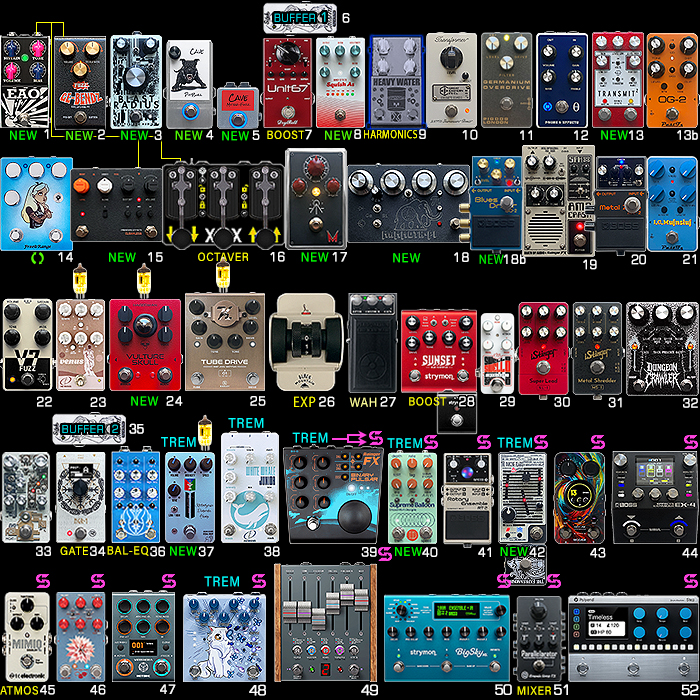
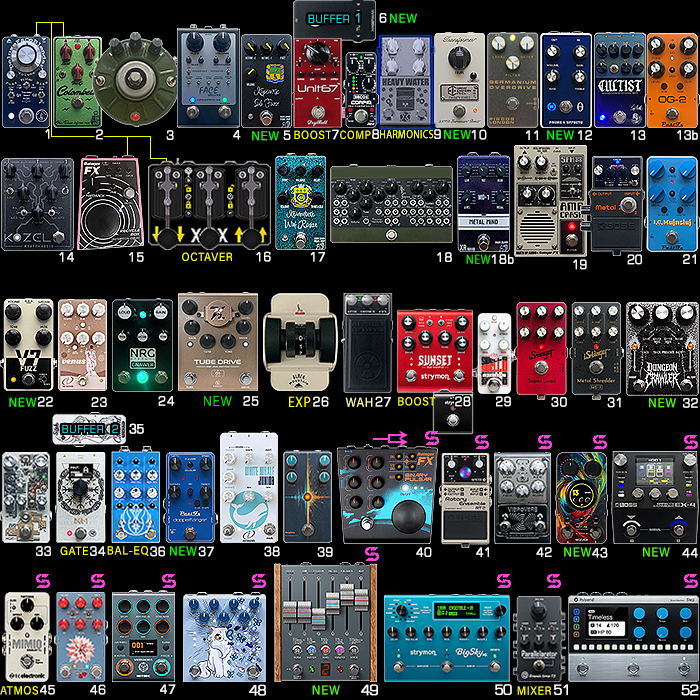
The EX-4 comes onto my board on Slot #44 in place of the Eventide H90. We’ll see how long an innings the EX-4 commands - but so far so very good!
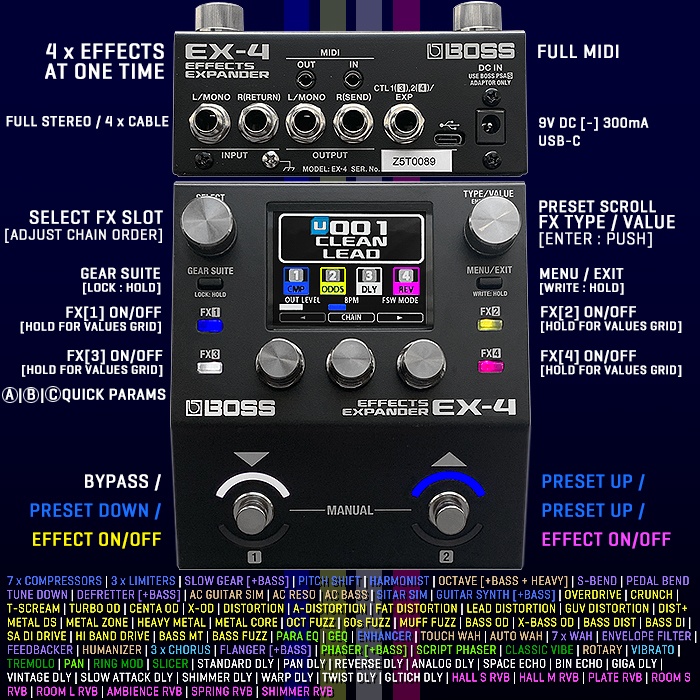
CONTROLS
(_) SELECT knob (Effect Slot / Navigate Rows) | (_) TYPE / VALUE knob [Enter : Push] (Click for Effect Type List / Scroll)
[ GEAR SUITE ] button (per slot) [Lock : Hold] | [ MENU / EXIT ] button [Write : Hold]
FX [1] - - - - - - - FX [2] - Quick Press On/Off | Hold for Values Grid
FX [3] - - - - - - - FX [4] - Quick Press On/Off | Hold for Values Grid
QUICK PARAMS : (_) A | (_) B | (_) C (target parameters in rows of 3)
▼ [1] LEFT FOOTSWITCH | [2] RIGHT FOOTSWITCH ▲
You can adjust parameters in 3 ways - via the 3 x Quick Params, Clicking Page Left/Rigth for Previous/Next row of 3 Params, or hold FX button to see c. 3 x 3 Value Grids of all the Params at one time.
There are 4 options for the Footswitches
- ▼ Preset Down | Preset Up ▲
- ▼ On/Off | Preset Up ▲
- ▼ FX [1] On/Off | FX [2] On/Off ▲
- ▼ FX [3] On/Off | FX [4] On/Off ▲
I have mine set per the 2nd Option! Would be nice if I could Hold or quick Double-tap the Right Footswitch to Reverse the Direction - so I can Page Up or Down via the Right Footswitch! Something for the next firmware update possibly!
REAR PANEL - 1/8" TRS MIDI Out and In, 1/4" TS Left/Mono In, 1/4" TS Right In/Return, 1/4" TS Left/Mono Out, 1/4" TS Right Out/Send, CTL 1 [3], CTL 2 [4], USB-C, 9V DC [-] 300mA, Ground Screw.
KEY FEATURES
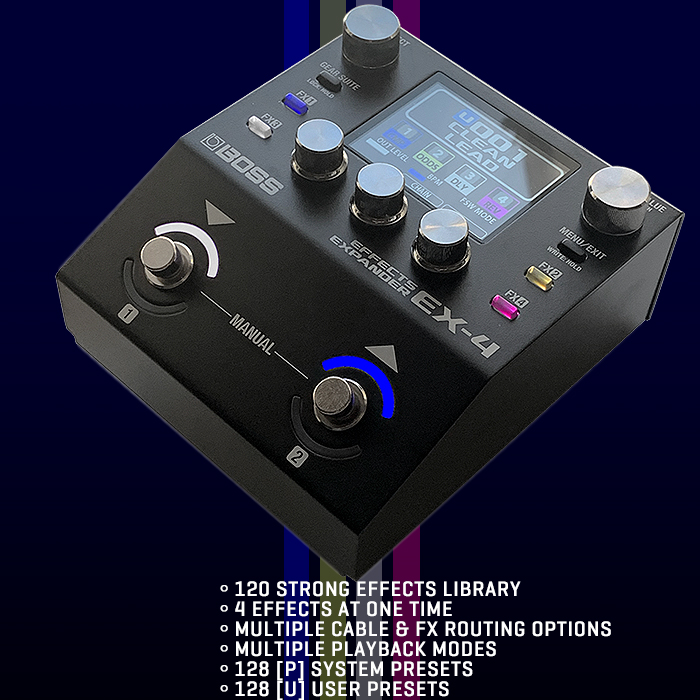
- Compact effects processor that expands the capabilities of any pedalboard
- 120 premium BOSS effects, including Overdrives/Distortions, Mod effects, Delays, Reverbs, and more
- Run up to four effects at once, including multiple instances of the same effect
- Dedicated utility blocks, including foot volume, two noise suppressors, send/return, and divider/mixer
- Fluid operation with an informative colour display, intuitive knobs, and dedicated FX buttons
- Independent global EQ for overall sound shaping
- Gear Suite feature allows you to quickly configure each effect with the turn of a knob
- Control effects using dual multi-function footswitches with colour LEDs
- Versatile mono/stereo I/O, flexible effect loop, and space-saving TRS MIDI jacks
- Manual and Memory modes for stompbox-style or preset-based effect control
- 128 preset memories for guitar and bass, plus 128 user memories for saving custom sounds
- Create complex effect configurations with advanced series, parallel, and wet/dry options
- Use the effect loop to build reorderable chains with external pedals
- Seamless memory changes with full carryover of delay and reverb effects possible with certain effect configurations
- Use the footswitches for basic effect and preset control, or access deeper assignment features for sophisticated custom operation
SPECS
- No Analog Dry-Thru, AD > DA Processing on Core Signal
- Sampling Frequency : 48 kHz
- AD Conversion : 24 bits + AF method (Adaptive Focus method). This is a proprietary method from Roland & BOSS that vastly improves the signal-to-noise (SN) ratio of the AD and DA converters
- DA Conversion : 32 bits
- Processing : 32-bit floating point
- Effects : 120 types
- Maximum Number of Effects : 4(FX[1]-FX[4]) + 6(DIVIDER+MIXER, SEND RETURN, FOOT VOLUME, NOISE SUPPRESSOR1, NOISE SUPPRESSOR2, GLOBAL EQ)
- Memories : 128 (User) + 128 (Preset)
- Nominal Input Level : INPUT L/MONO jack, INPUT R(RETURN) jack: -10 dBu
- Maximum Input Level : INPUT L/MONO jack, INPUT R(RETURN) jack: +7 dBu
- Input Impedance : INPUT L/MONO jack, INPUT R(RETURN) jack: 1 M ohm
- Nominal Output Level : OUTPUT L/MONO jack, OUTPUT R(SEND) jack: -10 dBu
- Output Impedance : OUTPUT L/MONO jack, OUTPUT R(SEND) jack: 1 k ohm
- Recommended Load Impedance : OUTPUT L/MONO jack, OUTPUT R(SEND) jack: 10 k ohms or greater
- Controls : DOWN/1 switch, UP/2 switch, MENU/EXIT button, GEAR SUITE button, FX1 button, FX2 button, FX3 button, FX4 button, SELECT knob, TYPE/VALUE knob, 1-3 knobs
- Display : Colour Graphic LCD (320 x 240 dots)
- Connectors : INPUT L/MONO jack, INPUT R(RETURN) jack, OUTPUT L/MONO jack, OUTPUT R(SEND) jack, : 1/4-inch phone type MIDI IN jack, MIDI OUT jack : Miniature phone type, CTL1([3]),2([4])/EXP jack: 1/4-inch TRS phone type
- USB port : USB Type-C(R)
- 9V DC IN [-] jack
- Power Supply : AC adaptor (PSA-S series)
- Current Draw : 300 mA
- Dimensions (without rubber feet) : 117 (W) x 138 (D) x 63 (H) mm | 4-5/8 (W) x 5-7/16 (D) x 2-1/2 (H) inches
- Dimensions (including rubber feet) : 117 (W) x 138 (D) x 65 (H) mm | 4-5/8 (W) x 5-7/16 (D) x 2-9/16 (H) inches
- Weight : 800g / 1 lb 13 oz
- MAP / RRP : $329 / €349 / £296
RECOMMENDED ACCESSORIES / OPTIONS
- Footswitch : FS-5U, FS-5L, FS-6, FS-7
- Expression Pedal : FV-500L, FV-500H, EV-30, Roland EV-5
- TRS/MIDI connecting cable : BMIDI-5-35, BMIDI-1-35, BMIDI-2-35, BCC-1-3535, BCC-2-3535
You can read up more about the EX-4 Effects Expander on the Boss Website!
FX[2] Slot Selected
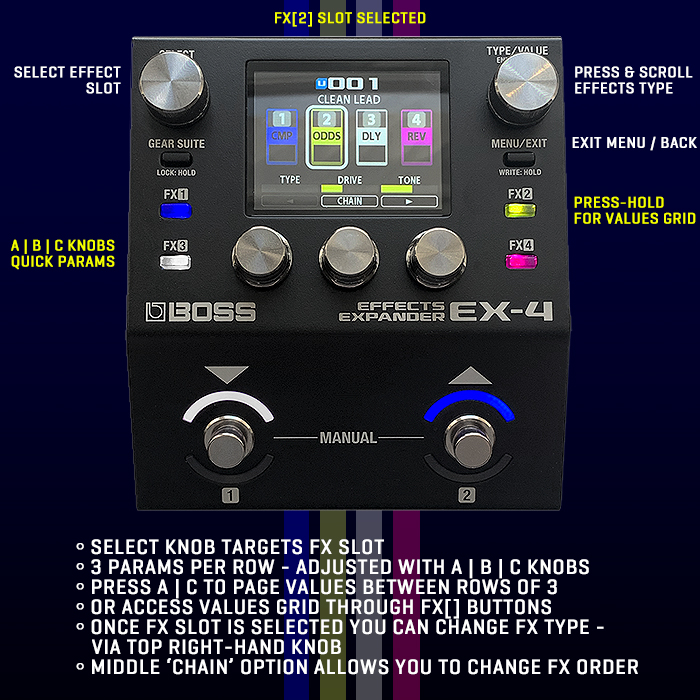
In the top visual we see the main default screen - which for the A | B | C Quick Params knobs has the below options as default, with the upper row being the twist / turn adjustments, and the lower row being the click / press navigation :
OUT LEVEL | BPM | FSW MODE
[ < ] [ CHAIN ] [ > ]
You essentially get to access the CHAIN / ORDER or Page Back or Forth for different Effect options - by clicking / pressing those knobs.
You can then use the left-hand SELECT knob to select a particular Effect Slot - which in our example is ODDS on Slot FX [2]. SELECT chooses the slot, you can then either click on the right-hand TYPE/VALUE knob to get the full list of Effect Types.
Or you can Hold down the FX [2] button in our example to get to the Values Grid screen, and for this selection - the two active functional rows - twist / turn, and click / press being
TYPE | DRIVE | TONE
[ - ] [ CHAIN ] [ > ]
For ever Selection you get different options visible - where you can either use the [ < ] [ > ] Page Back / Forward Navigation, or else hold the FX Slot button - e.g. FX [2] to see a full overview of the Effect Slot Values Grid.
As I say several times in this overview / review - I found the entire navigation of this pedal very easy and intuitive. I only need further explanation for the Gear Suite. Everything else was incredibly self-evident, and self-explanatory. You get used to this pedal's operation in no time at all.
And the core interface is really smartly thought out!
FX Values Grid
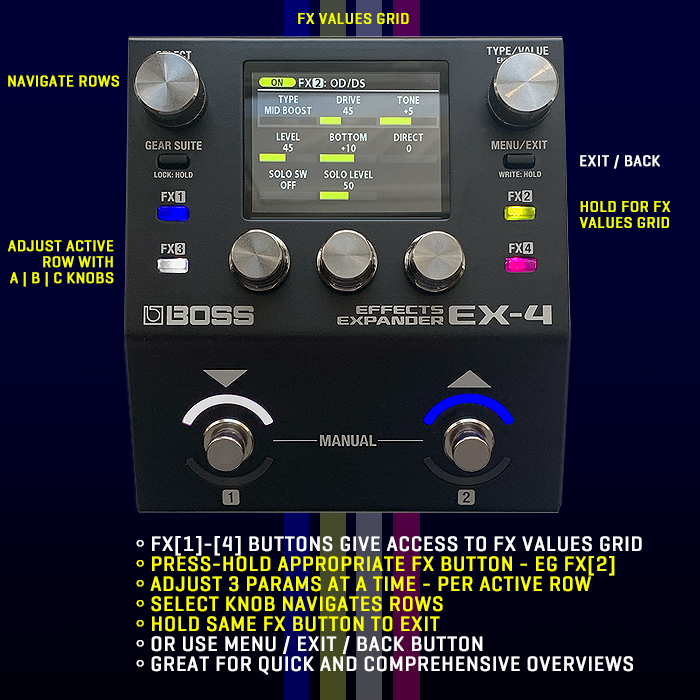
For the 4 x FX Buttons
FX [1] - - - - - - - FX [2]
FX [3] - - - - - - - FX [4]
If you Press-Hold one of those buttons - e.g. FX [2] as in the above example.
You get to see the full Values Grid - in Rows of 3 - which correspond to the A | B | C Quick Param Adjust knobs. You usually have 2 or 3 rows, as little as 1, and typically not more than 4 or 5.
You use the left-hand SELECT knob to navigate the Rows - and then adjust those Params via the A | B | C knobs.
In the above example for ODDS MID BOOST we have 3 Rows :
TYPE | DRIVE | TONE
LEVEL | BOTTOM | DIRECT
SOLO SW | SOLO LEVEL
That's pretty much all there is to it.
This differs from the [<] Page Left | Page Right [>] default action you get on the selected FX slot.
I generally prefer editing via the Values Grid - as I can get a full overview of what's going on.
You press-hold the same FX button to exit, or else press the MENU / EXIT button to go back!
List of FX Categories / Types
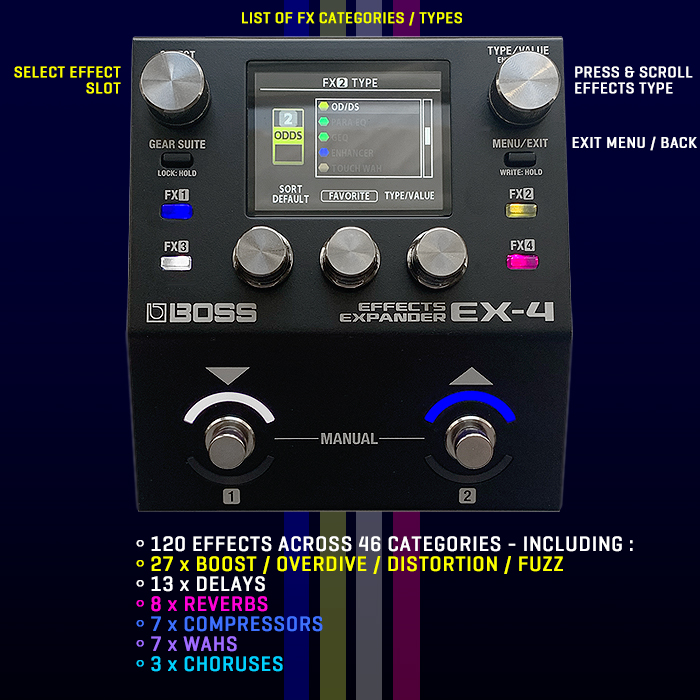
EFFECTS CATEGORY - Types [120 Effects!]
Once on a selected FX slot - you can hit the right-hand Type Value Knob to get the full list of Effects available - all 120 of them - per the following,
- COMPRESSOR - Boss Comp | D-Comp | Orange | X-Comp | Stereo | X-Bass
- LIMITER - Boss | Rack 160D | VTG Rack U
- SLOW GEAR
- BASS SLOW GEAR
- PITCH SHIFT - 1 Voice | 2 Mono | 2 Stereo
- HARMONIST - 1 Voice | 2 Mono | 2 Stereo
- OCTAVE
- BASS OCTAVE
- HEAVY OCTAVE
- S-BEND
- PEDAL BEND
- TUNE DOWN
- DEFRETTER
- BASS DEFRETTER
- ACOUSTIC GUITAR SIM
- ACOUSTIC RESO
- ACOUSTIC BASS
- SITAR SIM
- GUITAR SYNTH - Saw | Square
- BASS SYNTH - Saw | Square
- ODDS [OverDrive / Distortion / Fuzz] - Mid Boost | Clean Boost | Treble Boost | Natural OD | Warm OD | Blues OD | OverDrive | Crunch | T-Scream | Turbo OD | Centa OD | X-OD | Distortion | A-Distortion (Adaptive) | Fat Distortion | Lead Distortion | Rat | Guv'nor Distortion | Distortion+ | X-Distortion | Metal Distortion | Metal Zone | Heavy Metal | Metal Core | Octave Fuzz | 60's Fuzz | Muff Fuzz | Bass OD | X-Bass OD | Bass Distortion | Bass DI | SA DI Drive | Hi Band Drive | Bass MT | Bass Fuzz
- Para EQ
- GEQ
- ENHANCER
- TOUCH WAH
- BASS TOUCH WAH
- AUTO WAH
- WAH - Cry Wah | VO Wah | Fat Wah | Light Wah | 7 String Wah | Reso Wag | Bass Wah
- ENVELOPE FILTER
- FEEDBACKER
- HUMANIZER - Picking | Auto
- CHORUS - Mono | Dir/EFX | Stereo
- FLANGER
- BASS FLANGER
- PHASER
- BASS PHASER
- SCRIPT PHASER
- CLASSIC VIBE
- ROTARY
- VIBRATO
- TREMOLO [100 Waveforms] (0 = Smooth Triangle/Sine | 50 Blend of Triangle/Sine | 100 Square Wave)
- PAN [TEMOLO] [100 Waveforms]
- RING MOD
- SLICER - Pattern P1-P20
- DELAY - Standard | Pan | Reverse | Analog | Space Echo | Bin Echo | Giga Delay | Vintage Digital | Slow Attack | Shimmer | Warp | Twist | Glitch
- REVERB - Hall Small | Hall Medium | Plate | Room Small | Room Large | Ambience | Spring | Shimmer
Chain - Order
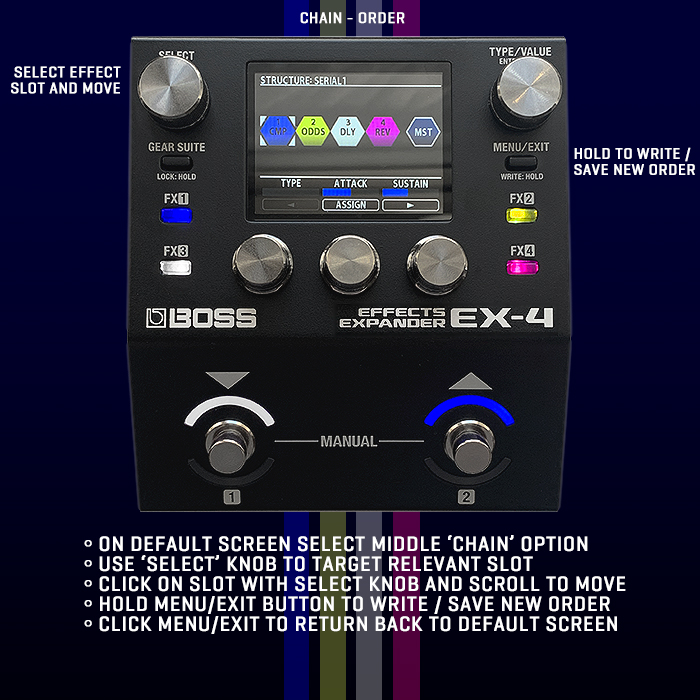
Per the FX[2] Slot Visual above (3rd from top), you can see the [CHAIN] Option in the bottom centre of the screen.
Once you hit [CHAIN] you get taken to the above screen - where you can adjust the order of the 4 effects.
Tune the left-hand SELECT knob to select appropriate slot - then click and move it as appropriate.
And hold MENU/EXIT WRITE button to save your changes!
You have total freedom over how you order those 4 slots!
If you select the last MST Master Block - you get the 'STRUCTURE' Option - which allows you to set the routing for those 4 effects :
- SERIAL 1
- SERIAL 2
- PARALLEL 1
- PARALLEL 2
- PARALLEL 3
So you have 5 ways in which you can Configure those effects - as well as set their Chain Order!
The Gear Suite
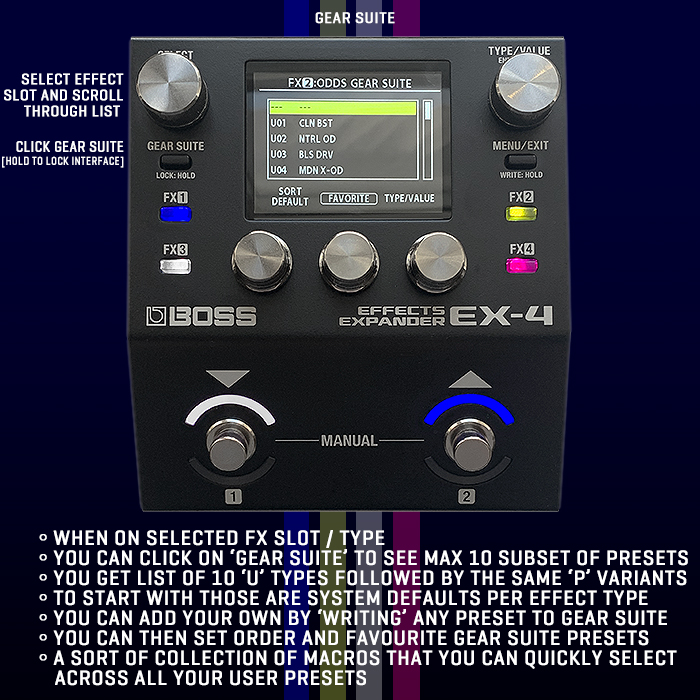
This is intended for Pro Players mostly - where you can save specific Values Presets per Effect Type - up to 10 per Effect - such that you maintain a collection of all your favourite settings per Effect Type - that you can call upon quickly and universally like a sort of Macro - to save you having to re-enter all those settings each time you want to call on that same effect!
By default you have several Systems Presets saved to the Gear Suite slot, while you can add your own when you Save / Write a new Preset.
THE WRITE MENU
When you long-press the MENU/EXIT button you activate the 'Write / Save' function, and get taken to the WRITE MENU, which gives you 4 options
- WRITE - Save edited contents to Memory
- INITIALIZE - Restore (Initialize) each User Memory to its standard settings, Useful for creating a new Memory from scratch
- MEMORY ORDER - Change the Order of User Memories : U001-U128
- GEAR SUITE WRITE - Save Settings of Each Effect as a Gear Suite
I mostly just do the regular 'WRITE' which his still a little clunky as you need to go through several fields - Target Slot / Name etc. I would prefer if you just long-press the Enter / Select knob that it just instantly saves over that Preset slot - rather than take you through a sequence of actions.
I was initially a little confused by the Gear Suite - which was actually launched with the GX-1/B at the start of the year. I could see all the Effects Types on the Value List, but then we had this Gear Suite Menu too - with different labels for seemingly the same Effects!
"Each effect type features a number of presets (GEAR SUITE P01–) configured by a pro guitarist who knows all about the characteristics of these effects. You can recall these settings simply by turning the knob. You can’t overwrite these presets."
So these are essentially a subset of Presets that you can call on quickly and easily - and save yourself from having to re-enter all those values each time you wish to call upon that specific effect. You can't delete or edit those default Gear Suite Values, but you can add to them - via the WRITE MENU - per the above instructions.
For instance if you select GEAR SUITE on the PH-Phaser Effect Type, you get 4 Options
- U01 NY STYLE
- U02 8 STAGE
- U03 12 STAGE
- U04 INIT
It's a smart way to call up existing settings values - such that if you have a specific set of favourite values for an Effect Type - you can then apply those universally to all Presets you use that Effect Type on!
I personally find it a little clunky to use, but I can see it's value - particularly for Pro Players and Touring Musicians who can then effect changes very rapidly and consistently!
Settings Menu
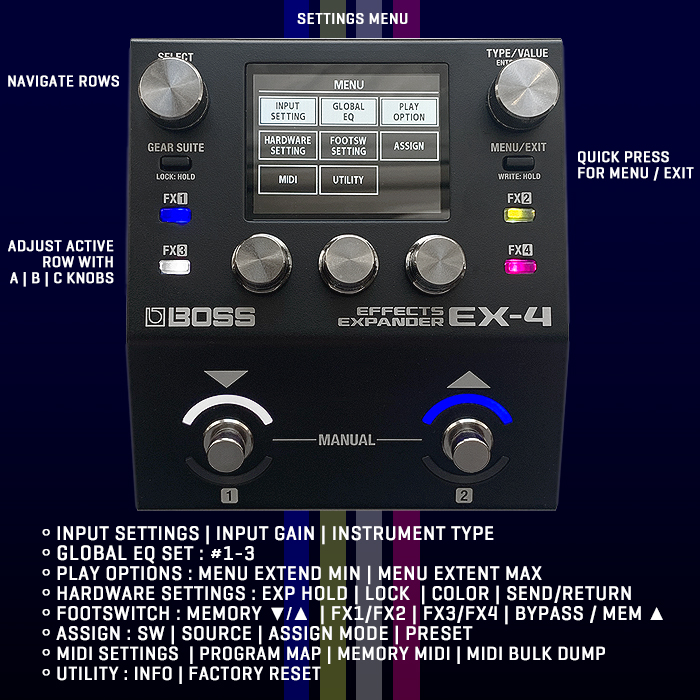
MENU (Quick-Press Menu button to enter / exit)
- INPUT SETTING - Set 1-10 | Input Gain | Instrument Type (Guitar/Bass)
- GLOBAL EQ - Off/Set | Set : Set 1-3 | Low Gain | High Gain | Mid Freq | Mid Q | Mid Gain | Low Cut | High Cut | Level
- PLAY OPTIONS - [Men Extent Min | Men Extent Max]
- HARDWARE SETTING - Exp Hold | Lock | Color | Send/Return Mode On/Off
- FOOTSWITCH SETTING - Memory / Manual : Mem ▼/▲ | FX1/FX2 | FX3/FX4 | Bypass/Mem ▲
- ASSIGN - SW (Switches) | Source | Assign Mode | Preset
- MIDI - MIDI Setting | Program Map | Memory MIDI | MIDI Bulk Dump
- UTILITY - Info | Factory Reset
So far I've just used the Input Gain setting a smidge, I tend to adjust my Guitar Tone Control a lot - and have not felt the need to apply any Global EQ's as yet.
Play Options are quite cool for touring musicians - as you can limit the number of available Presets - for easier access to those you need!
I've mostly had very little cause to use this. section - while I would imagine quite a few players would want to set their Input Gain and Global EQ's - you can tune those into different Amps / Rigs.
The 128 User and System Presets
128 System [P] and 128 User-definable Presets [U]
104 for GUITAR, 24 for BASS
Note that Para EQ is frequently used to fill up the remaining slots, and is typically greyed out / inactive [Para EQ]
Preferred Presets in BOLD
10 Favourite Presets UNDERLINED
GUITAR
- U/P 001 : CLEAN LEAD - Boss Comp + Mid Boost + Standard Delay + Room L Reverb
- U/P 002 : DYNAMIC LEAD - Orange Comp + Crunch +
Para EQ+ Analog Delay - U/P 003 : TAPE ECHO - Space Echo + Hall M Reverb +
Para EQ+Para EQ - U/P 004 : SYMPHONY - Boss Comp + Slow Gear + Mono Chorus + Shimmer Delay
- U/P 005 : BLACK HALL - Analog Delay + Shimmer Reverb +
Para EQ+ Para EQ - U/P 006 : 60s ROCK 'N ROLL - Overdrive + Spring Reverb + Space Echo + Para EQ
- U/P 007 : TREMOLO CLEAN - X-Comp + Tremolo Wave 27 +
Para EQ+ Room S Reverb - U/P 008 : FUNKY A-WAH - D-Comp + Auto Wah + Room S Reverb +
Para EQ - U/P 009 : SHIMMER HALL - Shimmer Reverb + Standard Delay + Standard Delay +
Para EQ - U/P 010 : FLEX CLEAN - Treble Boost + Mono Chorus + Boss Comp + Standard Delay
- U/P 011 : ACOUSTIC GUITAR - Acoustic Gtr Sim + X-Comp + Para EQ + Hall M Reverb
- U/P 012 : RICH & LAYERED - X-Bass + Space Echo + Mono Chorus + Shimmer Reverb
- U/P 013 : TRIO CHORUS - Mono Chorus + Mono Chorus + Mono Chorus + Para EQ
- U/P 014 : SMOOTH VIBRATO - X-Comp + Vibrato + Space Echo + Shimmer Reverb
- U/P 015 : DETUNED DS LD - X-Distortion + 2 Mono Pitch Shift + Standard Delay + Hall M Reverb
- U/P 016 : W&F BLISS - X-Comp + Flanger + Space Echo + Shimmer Reverb
- U/P 017 : STADIUM ROCK - Mono Chorus + Lead DS + GEQ + Room L Reverb
- U/P 018 : BOUNCE ARPEGGIO - Octave + 1 Voice Pitch Shift + 1 Voice Pitch Shift + Space Echo
- U/P 019 : CHURCH LEAD - Clean Boosst + Natural OD + Space Echo + Ambience Reverb
- U/P 020 : SYN-FUZZ - Octave Fuzz + Ring Mod + Standard Delay + Para EQ
- U/P 021 : FOREVER CLEAN - Mono Chorus + Plate Reverb + Space Echo + D-Comp
- U/P 022 : OC METAL - Octave + Metal DS + Para EQ + Para EQ
- U/P 023 : DELAY WITH YOU - Para EQ + Space Echo + Space Echo + Hall M Reverb
- U/P 024 : CRUNCHY TREMOLO - Crunch + Mono Chorus + Tremolo Waveform 50 + Space Echo
- U/P 025 : SLAP BACK - Space Echo + Spring Reverb +
Para EQ+Para EQ - U/P 026 : FUZZ + DS - Clean Boost + Warm OD + Muff Fuzz + Spring Reverb
- U/P 027 : LUX REVERS - Reverse Delay + Plate Reverb +
Para EQ+Para EQ - U/P 028 : PHASE-GAZER - Boss Comp + Octave Fuzz + Overdrive + Phaser
- U/P 029 : BIG ORCHESTRA - Voice 2 Mono Pitch + GEQ + Pan Delay + Shimmer Reverb
- U/P 030 : EXT METAL FLANGER - Metal DS + Voice 1 Pitch + Flanger + GEQ
- U/P 031 : SLOW GEAR - Slow Gear + Octave Fuzz + Para EQ + Para EQ
- U/P 032 : SYNCOPAD - Shimmer Reverb + Slicer P18 +
Para EQ+ Ambience Reverb - U/P 033 : STADIUM HR - Script Phaser + Overdrive + X-OD + Standard Delay
- U/P 034 : MEGA SHIMMER - Natural OD + Shimmer Reverb + Shimmer Reverb + Standard Delay
- U/P 035 : MILD JAZZ - Clean Boost + Para EQ + Standard Delay + Room S Reverb
- U/P 036 : FUZZ GATE - Flanger +
Octave Fuzz+ Slicer P8 + Space Echo - U/P 037 : RETRO AMBIENCE - Blues OD + Tremolo Wave 50 + Space Echo + Spring Reverb
- U/P 038 : FUNKY ROCK - Boss Comp + Blues OD + Mono Chorus + Standard Delay
- U/P 039 : HEAVY OCTAVE - Octave + Vibrato + Heavy Metal + Para EQ
- U/P 040 : DANCING TREMOLO - Orange Comp + Overdrive + Tremolo Wave 56 + Standard Delay
- U/P 041 : HI-FI CHURCH - Boss Comp + Stereo Chorus + Room S Reverb + Plate Reverb
- U/P 042 : GRUNGE FUZZ - Octave + Muff Fuzz + Para EQ + Para EQ
- U/P 043 : DOUBLE LAYER PH - Orange Comp + Distoriton+ + Phaser + Hall S Reverb
- U/P 044 : DEEP DUB ECHO - Space Echo + Room L Reverb +
Para EQ+Para EQ - U/P 045 : RICH CHORUS - Mono Chorus + Standard Delay + Room S Reverb + Para EQ
- U/P 046 : JET FUZZ - Octave + Muff Fuzz + Flanger + Analog Delay
- U/P 047 : ROCK SHIMMER - Boss Comp + 60s Fuzz + Mono Chorus + Shimmer Reverb
- U/P 048 : ANALOG SPRING - Analog Delay + Spring Reverb +
Para EQ+Para EQ - U/P 049 : +5TH MOD LEAD - X-Dist + Flanger + Phaser + Voice 1 Pitch Shift
- U/P 050 : SCRIPT DRIVE - Script Phaser + Guv'nor Distortion + Para EQ + Para EQ
- U/P 051 : STRINGS PAD - Slow Gear + Shimmer Reverb + Standard Reverb +
Para EQ - U/P 052 : HALF STEP LOWER - Voice 1 Pitch Shift + Metal DS + GEQ + Para EQ
- U/P 053 : MONO ORGAN - Boss Comp + Octave + Voice 1 Pitch Shift + Rotary
- U/P 054 : QUACKY LEAD - Touch Wah + Orange Comp + Warm OD + Space Echo
- U/P 055 : DRILLED RIFF - Ring Mod + Rat + Slicer P1 + Para EQ
- U/P 056 : REPEAT NOTE - Tremolo Wave 74 + Reverse Delay + Slow Gear + Ambience Reverb
- U/P 057 : LIGHT CRUNCH - X-Distortion + Standard + Para EQ + Para EQ
- U/P 058 : BALLAD DELAY - Standard Delay + Shimmer Reverb + Para EQ + PARA EQ
- U/P 059 : SLICE & FILTERED - Muff Fuzz + Auto Wah + Slicer P1 + Hall M Reverb
- U/P 060 : STEP & SHIMMER - Boss Comp + Voice 2 Pitch Shift + Phaser + Shimmer Delay
- U/P 061 : SOFT PH LEAD - Phaser + Blues OD + X-Comp + Standard Delay
- U/P 062 : ACTION STAGE - Phaser + Distoriton + Slicer P14 + Room S Reverb
- U/P 063 : SUPER DELAY - Standard Delay + Ambience Reverb + Para EQ + Para EQ
- U/P 064 : TEXAS CRUNCH - T-Scream + Tremolo Wave 50 + Spring Reverb + X-Comp
- U/P 065 : ANALOG LUX DELAY - Para EQ + Analog Delay + Analog Delay + Spring Reverb
- U/P 066 : TREMOLO VOYAGE - Clean Boost + X-Comp + Tremolo Wave 50 + Room S Reverb
- U/P 067 : MELLOW TREMOLO - Tremolo Wave 50 + Analog Delay + Plate Reverb + Para EQ
- U/P 068 : NATURAL CRUNCH - Natural OD + Mono Chorus + Standard Delay + Hall M Reverb
- U/P 069 : SELF-REFLECT - Pan Delay + Touch Wah + Vibrato + Hall S Reverb
- U/P 070 : COUNTRY CRUNCH - D-Comp + Tremolo Wave 15 + Centa OD + Space Echo
- U/P 071 : SLICER PAD - Flanger + Slicer P1 + Slicer P8 - Shimmer Reverb
- U/P 072 : LA LEAD SOUND - Boss Comp + Lead DS + X-Distortion + Voice 1 Pitch Shift
- U/P 073 : PARALLEL SPACE - Standard Delay + Hall M Reverb +
Para EQ+Para EQ - U/P 074 : FUZZY LEAD - Muff Fuzz + Voice 1 Pitch Shift + Para EQ + Para EQ
- U/P 075 : REVERSE CONCERT - Standard Delay + Reverse Delay + Ambience Reverb + Para EQ
- U/P 076 : GARAGE PUNK - Clean Boost + Rat + Para EQ + Room S Reverb
- U/P 077 : WAVE MOD - Mono Chorus + Phaser + Para EQ + Para EQ
- U/P 078 : AOR LEAD - A-Distortion + Voice 1 Pitch Shift + Mono Chorus + Para EQ
- U/P 079 : BROKEN TOY - Ring Mod + Vibrato + Script Phaser + Para EQ
- U/P 080 : HARMO INC LEAD - Mid Boost + Lead DS + Voice 1 Harmonist + Standard Delay
- U/P 081 : SITAR SIM - Sitar Sim + X-Comp + Voice 1 Pitch Shift + Para EQ
- U/P 082 : RICH SHIMMER - Mono Chorus + Shimmer Delay +
Para EQ+Para EQ - U/P 083 : SLICER RIFF - Slicer P8 + Plate Reverb + Para EQ + Para EQ
- U/P 084 : SPIRAL FUZZ - Muff Fuzz + Octave + Classic-Vibe + Script Phaser
- U/P 085 : DEFRET ECHO - Defretter + Slow Gear + Mono Chorus + Space Echo
- U/P 086 : TRIO LEAD - Fat DS + Voice 2 Harmonist + Para EQ + Para EQ
- U/P 087 : MEGA JET FLANGER - Classic-Vibe + Flanger +
Para EQ+Para EQ - U/P 088 : ROTORIZED - Natural OD + Rotary + Room L Reverb + X-Comp
- U/P 089 : DOUBLE FILTER - Humanizer Auto + Auto Wah + Para EQ + Para EQ
- U/P 090 : CHOFIELD - Mono Chorus + T-Scream + Para EQ + Para EQ
- U/P 091 : DEEP AMBIENT - Hall M Reverb + Standard Delay +
Para EQ+Para EQ - U/P 092 : CHO + MOD DLY - Stereo Chorus + Standard Delay + Para EQ + Para EQ
- U/P 093 : SYNC AW+PH+OD - Auto Wah + Phaser + Standard Delay + Plate Reverb
- U/P 094 : TOUCH FUNK - Clean Boost + Touch Wah + X-Comp + Room S Reverb
- U/P 095 : 8bit LEAD - Octave Fuzz + Voice 2 Pitch Shift + GEQ + Analog Delay
- U/P 096 : MELODY SMOOTH - X-Comp + Clean Boost + Acoustic Reso + Plate Reverb
- U/P 097 : RING TALK - Tremolo Wave 71 + Ring Mod + Vibrato + Room L Reverb
- U/P 098 : BUBBLE TONE - Crunch + Rotary + Mono Chorus + Para EQ
- *U/P 099 : SPACY S-BEND - S-Bend + Vibrato + Metal DS + Standard Analog [Matt's Favourite!]
- U/P 100 : REVERSE S-BEND - S-Bend + S-Bend + Distortion + Flanger
- U/P 101 : SPEED DOWN - Slicer P10 + S-Bend + Octave Fuzz + Distoriton
- U/P 102 : S2 DS & DI RECT - Fat DS + Analog Delay + Para EQ + Para EQ
- U/P 103 : P2 LEAD & CHORUS - A-Distortion + Standard Delay + Mono Chorus + Plate Reverb
- U/P 104 : P3 AC SET - Acoustic Gtr Sim + Acoustic Reso + Tremolo Wave 50 + Hall S Reverb
- U/P 105 : [Ba] ROCK BASIC - Bass OD + Para EQ + Para EQ + X-Bass Comp
- U/P 106 : [Ba] SLAP BASS - X-Bass Comp + GEQ + Para EQ + Para EQ
- U/P 107 : [Ba] PARA DRIVE - X-Bass Comp + X-Bass OD + Para EQ + Octave Fuzz
- U/P 108 : [Ba] HM PICK - X-Bass Comp + Bass MT + GEQ + Para EQ
- U/P 109 : [Ba] OC DRIVE - X-Bass COmp + Bass Octave + X-Bass OD + Para EQ
- U/P 110 : [Ba] FOREST - Shimmer Reverb + Analog Delay + Para EQ + Para EQ
- U/P 111 : [Ba] FL DRIVE - X-Bass OD + Bass Flanger + Shimmer Delay + Para EQ
- U/P 112 : [Ba] PH + REV - Bass Phaser + Hall S Reverb + Para EQ + Para EQ
- U/P 113 : [Ba] CHO DRIVE - Hi Band Drive + GEQ + X-Bass OD + Stereo Chorus
- U/P 114 : [Ba] W ECHO - Para EQ + Space Echo + Space Echo + Hall M Reverb
- U/P 115 : [Ba] N.W. FLANGER - Bass Flanger + Para EQ + GEQ + Hall M Reverb
- U/P 116 : [Ba] MOTO TOWN - Treble Boost + Para EQ + Para EQ + Para EQ
- U/P 117 : [Ba] MYSTERY - Ring Mod + Shimmer Delay + Para EQ + Para EQ
- U/P 118 : [Ba] Lo-Fi - Natural OD + Space Echo + Para EQ + Para EQ
- U/P 119 : [Ba] OCTAVER - X-Bass Comp + Bass Octave + Para EQ + Para EQ
- U/P 120 : [Ba] RAGGAE - Bass OD + Para EQ + GEQ +
- U/P 121 : [Ba] PICCOLO - X-Bass Comp + S-Bend + Bass DI + Spring Reverb
- U/P 122 : [Ba] CTB. - Acoustic Gtr Sim + Para EQ + Bass Defretter + Para EQ
- U/P 123 : [Ba] FUNK-TRON - Bass Touch Wah + Para EQ + Para EQ + Para EQ
- U/P 124 : [Ba] FRETLESS - Bass Defretter + Para EQ + Ambience Reverb + Para EQ
- U/P 125 : [Ba] FUZZ + PHASER - Ocrtave Fuzz + Bass Phaser + Para EQ + Para EQ
- U/P 126 : [Ba] S2 REC SET - Bass DS + GEQ + PEQ + PEQ
- U/P 127 : [Ba] P2 W AMP - X-Bass Comp + GEQ + Bass DI + Hall M Reverb
- U/P 128 : [Ba] P3 W BASS - Para EQ + GEQ + GEQ + Para EQ
Note that Matt Knight's favourite Preset is #99 - SPACY S-BEND, while I don't go for any of the Presets that have Gain Options included. I own all the Boss Gain Pedals in their original formats, alongside multiple modded and special editions of each. So those are what I prefer to use - more towards the start of the chain, while the EX-4 is in the Stereo Section - which is the last 1/3 of the Rig!
Final Thoughts
Overall a massively positive experience. I love the interface and ease of use here. And by and large most everything sounds pretty fantastic. I'm not overly taken by the various Gain voicings - but then those are really not for me - as I own all of Boss's Original Analog Gain pedals in their original Stompbox formats - and several in multiple and modded editions - which will always be my preferred route for those!
There are a few clunky bits within the interface that could be improved (The Write Screen, Gear Suite, Additional Smarts on the Footswitches etc.) - but by and large it's a pretty fantastic experience.
There are of course a few niggles and things I would like to be improved. Considering Boss was starting to include Analog Dry-Through Bypass on some of its digital pedals - like on its XS-1 and XS-100 Poly Pitch Shifters - I had hoped this would become a common feature, but No! For the EX-4 your signal gets Converted AD > DA regardless of whether the pedal is active or not. Boss have made some significant improvements though - as this EX-4 doesn't colour my signal anyway near as much as my GT-1000 Core used to. Here I didn't feel the need to apply any Global EQ's. I did though need to whack up the Output Level significantly, and I increased the Input Gain by +3dB. (But that may just be my complicated rig - Capacitance, Impedance etc.)
I was disappointed to not see a DC-2 Dimension voicing here - that is only available on Boss's DC-2W, MD-500 and PX-1 devices. I've no idea why that is the case - Most of Boss's competitors have a version of that celebrated Roland / Boss effect. Also there is still no Harmonic Tremolo - a Tremolo variant that dates back to 1959 - with Fender's 1959 Concert and Vibrasonic Amps. Two of my most favoured Modulation Effects are the DC-2 Dimension and Harmonic Tremolo - and it's a shame that this all-rounder Multi-FX Workstation does not fully cater to those needs. Boss has never done a Harmonic Tremolo - so that is more understandable - but the continued absence of the DC-2 on so many Boss devices remains a mystery for me! It's a key reason why I don't own the MD-200 - in fact the only Boss 200 Series Pedal that I don't own!
I picked up the full operation of this pedal very easily - and entirely without a manual - it really is one of the most intuitive Boss pedals I've come across to date. Boss don't always excel on the interface front - but they pretty much nailed it here. They mostly use the iconic enclosure colours you're accustomed to - on their Effects visuals - while the Dark Grey of Reverb has been replaced by Violet here - as Dark Grey is typically representative of a suspended or inactive effect or functional state!
I'm a little more accustomed to the Gear Suite now - but I still find it a little clunky - and you seemingly can't see a Values Grid for the respective Gear Suite Profile - which would be supremely handy for all those Factory Default ones!
Price of admission here is $329 / €349 / £296 - which I feel is very fair. I feel that Boss was partially influenced by the conceptually similar but more expensive Fractal VP4 ($700) - which similarly has 4 Stereo Effects at a time, but a larger library of supposedly 400 Effects - and also it has to be said - Analog Dry-Through!
Looking at the various EX-4 Effects Categories - the Gain Section is the most impressive with no less than 27 varieties. While we're definitely missing some of the more useful Reverbs from the RV-500. Boss provides pretty decent bang for your buck here - but is lagging a touch behind its competitors on the overall size of its effects libraries. That said - the 120 included Effects mostly sound pretty great, and I favour 38 of those Factory Presets!
Overall I feel Matt and his team have done some really wonderful work here - it's a very easy pedal to deploy - and it consistently delivers great sounds for me. I frequently get into debates with some of my cork-sniffer friends about 'Audio Fidelity' and in particular the 'Pristine' nature of Reverbs - while all that eventually gets a little nonsensical - what matters is that the sounds appeal to your own senses - and sound properly decent to your own ears - which most of these really do for me. That's not to say you don't need to do a little tweaking here and there, but generally the experience was pretty fantastic fully unadulterated and out of the gate!
I do feel this is very fairly priced - while I would have liked to have seen a few more Effects Options - as mentioned above. And where the Delay and Gain Coverage is pretty much spot on in its width and depth. As mentioned before - I prefer to use all my original Analog Boss Gain Pedals - so that largest Effect selection has minimal use for me here - while the Boosts can really work to enhance and augment certain Presets. Anything more than a Boost doesn't particularly work well for me, But then again - my rig is ever so complicated!
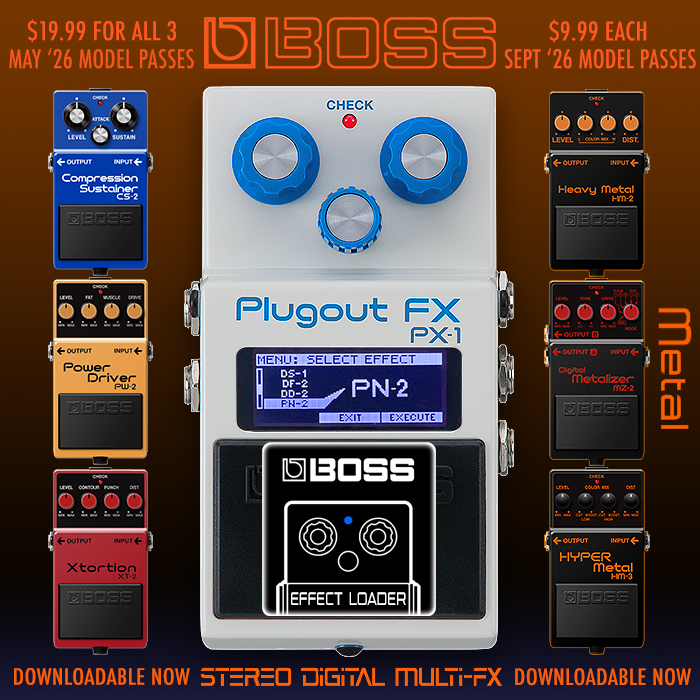
The EX-4 Effects Expander should be available at most international Boss dealers around the same time this article goes live! As a Boss fan - this pedal makes a lot of sense to me - as I'm so familiar with Boss's effects library - I just wish we had more of it here. Boss has some odd distinctions as to which Effects are allowed on to which device - with several uniquely appearing on the PX-1 Plugout - while you're limited to only 16, the first 8 of which are unchangeable! I definitely feel these is some room for improvement here, but overall it's a very decent device. Hopefully I've provided you with all the details that you need to make a decision.
The EX-4 replaces the Eventide H90 for a duration - we'll see how long it holds that slot. Each of those has its own advantages, and of course there's also the somewhat larger Fractal VP4 too in that same sort of vicinity!
Demos