

Xploration • Curation • Recommendation


Parallelarator Advanced Usage Tips courtesy of Cosmic Loop FX's Rich Cattell


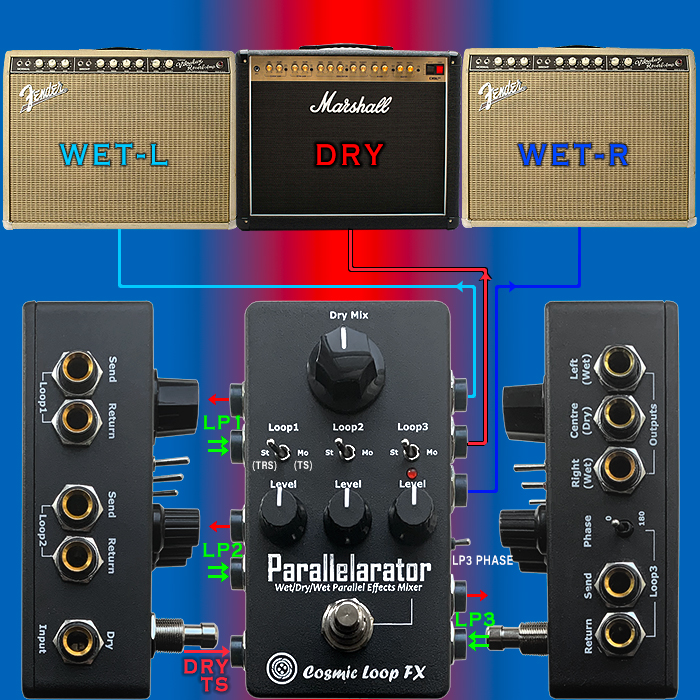
Following on from my March feature on the Parallelarator - there have been a number of follow-up questions. So obviously my initial post didn’t quite cover all the angles - hopefully this piece will better help you make up your mind!
I have had a few questions as to whether the Parallerator’s buffers colour the output in some way - where I can’t discern any noticeable colouring, in fact for me the use of this devices has been all-round beneficial - not just net beneficial. The main benefits for me are :
- Clarity
- Articulation
- Separation
The simple truth is that my signal-chain has never sounded better! And I have no reason to think that you might have a different experience of this device to me - while all rigs of course have differences. My pedal-chain is incredibly complex - and the Parallelarator has clearly improved the output - it has never sounded so good!
Here follow Rich’s Top Tips - edited by yours truly of course!
1. Use the Footswitch as a Dry Kill / Dual Dry Level Switch
The Parallelarator allows you to creatively repurpose its footswitch to control your dry signal level—without needing any external switching devices. One particularly clever use is to treat Loop 3 as a 'dry level preset', allowing you to toggle between two dry levels or even mute the dry signal entirely.
SETUP INSTRUCTIONS
- Connect Loop 3 Send directly to Loop 3 Return using a patch cable
- Leave no effect in the loop—this is purely a signal passthrough
- Use the Loop 3 Level knob to set an alternate dry level
- Use the foot switch to activate or bypass Loop 3
RESULTS
- When Loop 3 is bypassed, the dry signal is set by the main Dry Mix control – if this is at zero, the footswitch acts as a dry kill
- When Loop 3 is engaged, the signal flows through Loop 3 and its level is determined by the Loop 3 Level knob
- If you set it lower or higher than the main dry level, the footswitch toggles between two dry signal levels
USE CASE IDEAS
- Dry Kill Mode : Set Dry Mix level to zero to instantly switch to a fully wet mix for ambient or experimental sections
- Dual Dry Mix : Use a lower dry level for rhythm playing and a higher one for solos to cut through the mix—without changing any effects
- Foot-controlled blending : Adjust the Loop 3 Level for subtle or dramatic shifts in dry/wet balance at the tap of a foot
2. The Left Output Jack Doubles as a Stereo TRS Output
The Parallelarator includes a clever output design that gives you more routing flexibility with minimal cabling.
Specifically - If nothing is plugged into the Right Output jack, the Left Output becomes a Stereo TRS (Tip-Ring-Sleeve) output.
WHAT THIS MEANS IN PRACTICE
When only the Left Output is used, it carries both the Left and Right signals as a stereo TRS signal:
- Tip = Left signal
- Ring = Right signal
- Sleeve = Ground
When a cable is plugged into the Right Output, the unit automatically splits the stereo signal into two separate mono outputs—Left and Right—on their respective jacks.
WHY THIS IS USEFUL
- A. Compact Stereo Output
- Use a single TRS cable to send a stereo signal to :
- A stereo input on a mixer, audio interface, or stereo effects unit
- A TRS-to-dual-mono Y-cable splitter for stereo amp rigs
- A stereo DI box for live or studio setups
- Use a single TRS cable to send a stereo signal to :
- B. Cleaner Pedalboard Wiring
- Save space and reduce cable clutter by running just one stereo TRS cable off your board—perfect for small or travel rigs
- C. Automatic Mono/Stereo Switching
- Plugging in the Right Output automatically disables stereo TRS mode on the Left Output, making setup intuitive
- No need for switches or settings—just plug and go
PRO TIP
- Use a TRS to dual TS (Y-split) cable if you're sending stereo from the Left Output to two amps or two channels on a mixer. It's a tidy way to preserve stereo imaging while using just one jack
3. Use the Parallel Link Port to Add an Extra Loop or Connect Another Parallelarator
The Parallel Link port lets you expand the capabilities of your Parallelarator by adding an additional stereo loop or by chaining multiple units together. It integrates seamlessly into the internal parallel mixer and is designed for use with optional Parallel Link cables, available in two configurations.
CABLE TYPES
- A. Input-Only Cable – Add a 4th Stereo Effect Loop
- This cable adds an extra stereo input into the Parallelarator’s internal mixer via the Parallel Link port.
- Ideal for adding a 4th parallel effects loop, especially for stereo pedals, multi-FX units, or even external instruments like synths or drum machines
- NOTE : The Parallelarator does not provide level control for this loop—set levels on the connected device to control its presence in the mix
- Use Case Example :
- You could plug in a stereo ambient reverb or a stereo looper and blend it in alongside your main 3 loops for huge, layered textures—all output together in true stereo
- B. I/O Cable – Add Stereo FX Input + Dry Signal Output
- This cable includes :
- A Stereo TRS jack that connects to the output of an external stereo device, feeding it into the Parallelarator’s mixer just like the Input-Only Cable
- A Mono TS jack that provides a dry signal output directly from the input of the Parallelarator
- What This Does :
- You get an extra stereo effect loop, just like with the Input-Only Cable
- Plus, you can tap a clean, unaffected signal from the Mono TS output—before any loops or processing
- Use Case Examples :
- Feed the dry output to a separate pedal chain or recording input for post-processing or reamping
- Use it as a source signal for another Parallelarator or mixer
- Key Points to Remember :
- The Parallel Link port adds a 4th parallel loop, not a replacement for any existing loops.
- There’s no onboard control over the level of the device connected via Parallel Link, so adjust it at the source
- The dry output from the I/O cable is always active and unaffected by the loop settings or footswitch state—ideal for routing clean/dry tone independently
- This cable includes :
- Pro Tip:
- You can daisy-chain multiple Parallelarators using the I/O cable and Parallel Link ports to build an expanded matrix of parallel FX loops, each with its own set of blend controls.
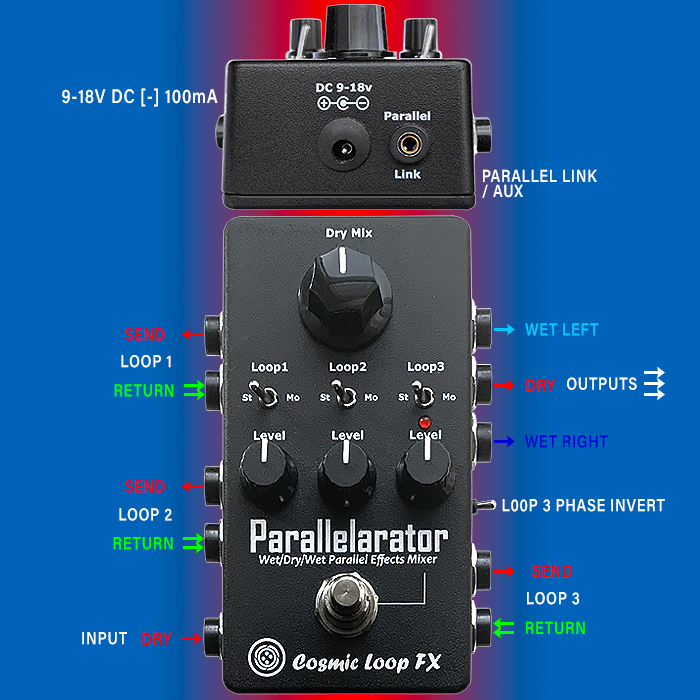
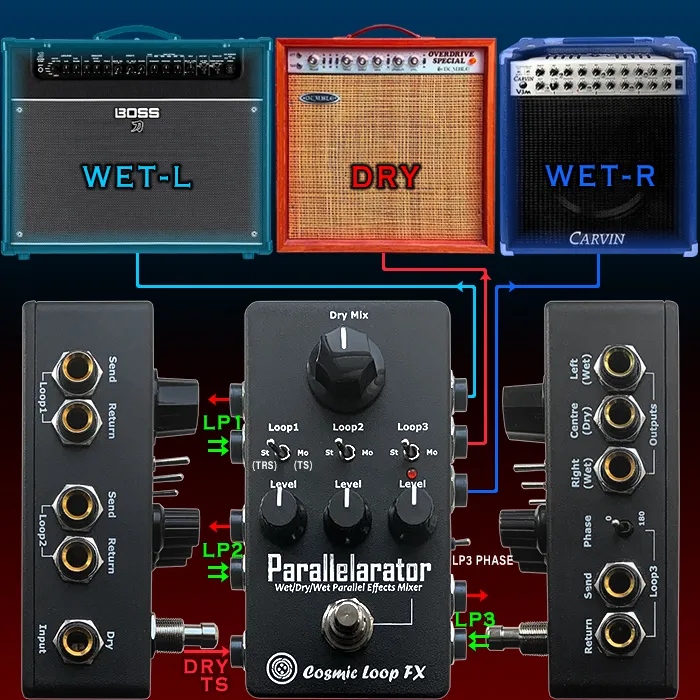
4. Connect the Parallelarator in the FX loop of your main (centre) amplifier
- The Parallelarator is designed to sit in the effects loop of your main amp. This position allows it to process the fully-amplified preamp tone rather than your guitar's dry signal. By connecting it here, you can create rich parallel effects chains that integrate seamlessly with your amp’s tone, offering studio-style flexibility in a live rig.
5. Enable the 'Dry Kill' option on effects connected to the loops
- When placing effects like Delay or Reverb into the Parallelarator’s loops, it's best to enable their dry kill or wet-only mode (if available). This ensures that only the processed effect signal is returned to the mix. The Parallelarator will handle the blending of dry and wet signals - so eliminating the dry component from the effect itself avoids phase and timing issues that can muddy your tone.
6. Use the Dry Mix control to blend dry signal back in for wider stereo imaging
- In wet/dry or wet/dry/wet rigs, a portion of the dry signal should always remain present in the centre to retain punch and clarity. The Dry Mix control on the Parallelarator allows you to dial in exactly how much of your core tone you want to retain. This is crucial for creating a spacious, stereo soundstage without losing definition or attack.
7 Use Loop 3 for ambient effects that need trails
- Loop 3 is ideal for Reverb or Delay pedals that support effect trails—meaning the effect continues to decay naturally after being bypassed. If you control the loop with a footswitch and leave the effect itself always on, you can turn Loop 3 on/off and preserve the decay when switching it off. This creates smooth transitions during playing, without abruptly cutting off echoes or reverb tails.
8. Place distortion/fuzz/overdrive effects before the Parallelarator
- Gain-based pedals (distortion, fuzz, overdrive) generally sound and feel better when placed before any parallel processing. Running them into the dry input of the Parallelarator means the wet loops remain clean and unaffected by gain compression, allowing time-based or modulation effects in the loops to stay more open and detailed. This setup also preserves your picking dynamics and articulation.
9. Use as an effect blender to mix extreme effects with your clean tone
- Have a ring modulator, pitch shifter, or glitch pedal that's fun but overwhelming? Run it in one of the loops and use the mix controls to dial it in subtly. The Parallelarator acts as a precision blending tool, letting you add just enough of an extreme effect to enhance your tone without losing its character. Great for experimental textures or studio layering
10. Avoid placing noisy pedals in Loop 3
- Because Loop 3 is left active for ambient trails or parallel blends, any noise from pedals in this loop can remain present even when the loop is bypassed from your board. Avoid using overly noisy vintage fuzzes or power-sensitive pedals here. Choose quiet, high-headroom pedals—especially for time-based effects—to keep your rig clean and noise-free.
Where to Buy
The Parallelarator Parallel Mixer and Wet/Dry/Wet Gateway is available to buy direct from the Cosmic Loop FX Webstore, where it goes for £285 (circa $379 / €335).
NOTE that there are still no YouTube demos for this pedal - there will be some eventually I believe, while this is a difficult pedal to demo - and you need a fairly complex rig present (with 3 amps) to fully demonstrate every part of this device!
Demos





Content Subscriptions