Xploration • Curation • Recommendation


Setting up Delay Presets and Tap Divisions on the Chase Bliss Big Time Hybrid Echo - alongside first impressions


Key Points
Doug Tolley’s Big Time Tour convinced the writer to buy a Big Time after hands-on time in Hanwell. Ordered with Fader Shield on 3 July, it arrived two months later; the learning curve was significant.
The first four Presets were: 0 Adapted Nice Delay + Modulation, 1 Dotted Eighth Delay, 2 Added Cluster Sorta Tape-style Delay, and 3 Dotted Eighth Ping-Pong Delay. All use Analog Voicing. Tap divisions are set in E Options Mode using SCALE with MOTION, MODE and VOICING.
The Big Time is studio-grade and versatile, though clunky to master. EchoSystem remains the fallback for ease of use; the first foray was overwhelmingly positive.
When the Big Time was first announced at the end of April, I wasn’t sure it was for me. I needed some further convincing - which took the form of Doug Tolley’s Big Time Tour - where he travelled to 4 locations in the UK, including Hanwell in West London - where interested parties could get some hands-on time with the new device.
I of course made that fateful journey, and was able to figure out pretty quickly that this was most definitely a device for me - even though in truth, only one of the onboard presets was fully usable for me - the Nice Delay. While through messing around with the device for a good 20 minutes or so - I was able to ascertain its potential, and decided that indeed I had to have one!
Doug’s Big Time Tour Hanwell Stop was on May 30th, while I already had commitments, and budgets allocated for the next 4-5 weeks. So I wasn’t in a position to order one until the start of July!
I ordered one (with Fader Shield of course) on the 3rd of July and that was delivered pretty much exactly 2 months later. My Mum’s sudden passing got in the way of my getting that pedal onto the board, as I had to travel to Iceland for the funeral arrangements. I thought I would need a fair amount of time to adjust to the new pedal - as it does have some significant depths of complexity. And a fairly significant learning curve.

There was a lot to get stuck into - several layers of settings, functions and options - where every control is pretty much applied in triplicate! There were a handful of videos that really helped the process - as included in the 'Demo' section below. Had I not attended Doug Tolley's Hanwell Chapter of the Big Time Tour, then Jackson Brooksby's Demo / Overview would certainly have pushed me over the line - while I was already convinced by then!
The first order of business for the Big Time was to dial in a handful of Presets - that would become my default Delays.
The obvious starting point was Factory Preset '0' - the Nice Delay - which I tweaked to my preferences for my first official Preset!
I ended up creating 4 Presets in the first session :
- 0 : Adapted Nice Delay + Modulation
- 1 : Dotted Eighth Delay
- 2 : Added Cluster Sorta Tape-style Delay
- 3 : Dotted Eighth Ping-Pong Delay
All 4 Presets use the Analog Voicing - which sounds superb!
0 : Adapted Nice Delay + Modulation
A relatively easy one to start with, here I just Edited an adapted the first Factory Preset.
I in the main adjusted the Tilt EQ, Feedback, and Wet Parameters.
I then Held down the SHIFT / Scale button to access the Secondary Parameters where I added some Sine Modulation, by giving that MOTION some DEPTH (Cluster). And bumped up the Dry Level a smidge too. And that was it really - first one in the bag super quickly. I used the Left Footswitch Tap Tempo - to set my Delay Timings.
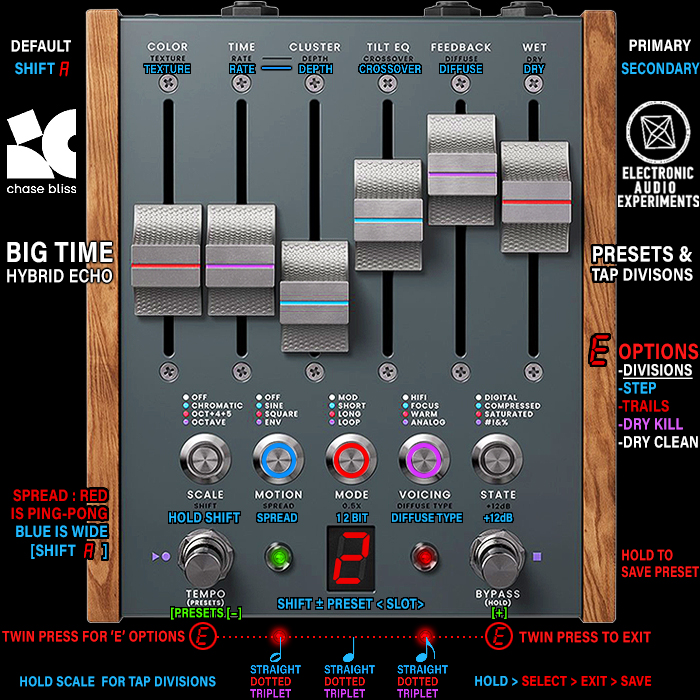
You spend a lot of time Press-Holding the Left Footswitch to flip between Panel (Red) and Preset (Green) Modes. Going to Panel to adjust your settings and set Tap Tempo, and then returning to Preset Mode to Save and organise the Preset's.
1 : Dotted Eighth Delay
Tap Divisions were a long-time conundrum for me for the Big Time, and it was a question that Doug was unable to answer at the Hanwell Meet-up. I think it may have been a later firmware update, as it's not mentioned in the manual.
It wasn't until I came across 'Medins Make Music' YouTube Video below - that I was able to figure out how to set a Dotted Eighth time signature.
You need to enter the 'E' Options Mode - by press both footswitches simultaneously, and then holding down the SCALE button, while you select the Tap Division via the MOTION, MODE and VOICING Buttons.
- HALF NOTE (Motion) - Blue = Straight, Red = Dotted, Violet = Triplet
- QUARTER NOTE (Mode) - Blue = Straight, Red = Dotted, Violet = Triplet
- EIGHTH NOTE (Voicing) - Blue = Straight, Red = Dotted, Violet = Triplet
So while you hold down the SCALE arcade button, you multi-press the appropriate Motion (1/2) / Mode (1/4) / Voicing (1/8) - so for me - you Press the Voicing button twice to get to the colour Red - which indicates Dotted Mode!
Then you exit the 'E' Options Mode by dual-pressing the two footswitches, get into Preset Mode - and Save said changes!
I made a few more tweaks to the parameters - adjusting them by ear until that Preset sounded right for me - and thus Preset '1' was done!
2 : Added Cluster Sorta Tape-style Delay
So my most preferred Delays tend to be Tape-style ones, and the Space Echo in particular. To get into Tape-Delay Multi-Tap territory - you apply the Cluster Control - relatively subtly, but then need to raise the Wet Level and Feedback for those taps to become properly audible!
While in Preset Mode - by holding down the SCALE button you can use the Footswitch to page up and down through the Preset Slots to select an alternative 'Save To' location. I used this a lot - where all the subsequent delays were kind of variants of my first Edited and Augmented, Modulation Enhanced 'Nice Delay' Adaptation!
This was a relatively simple exercise - just adding in the Cluster parameter, and again adjusting the active parameters by ear.
3 : Dotted Eighth Ping-Pong Delay
For the final of my first batch of Presets - I wanted some Ping-Pong action, where Dotted Eighth Ping-Pong almost always sounds great bouncing off your Left and Right Amps!
This is a simple SHIFT / Secondary [A] Parameters function which involves the MOTION / SPREAD Arcade Button. In Seconday / Alt Params Mode - you click on the Spread control once for Blue Stereo Widening Mode, and twice for Red Ping-Pong Mode - it's as simple as that.
I copied Preset 1, added the Ping-Pong - and again adjust the active Parameters to taste. All my Delays have fairly subtle Sinewave Modulation on them.
Note than when switching from the Empress EchoSystem to the Big Time - there was a notable and audible change to the core character of my rig - which required some further fine-tuning. The EchoSystem, at least per my setting, seems to add less colour to the signal. The Big Time is notably warmer and slightly less Bright by default - possibly just on the Analog Voicing! But some due diligence and tweaking of settings - gets you where you need to be!
Really all very straightforward - and each of these yielded superb results!
Final Thoughts
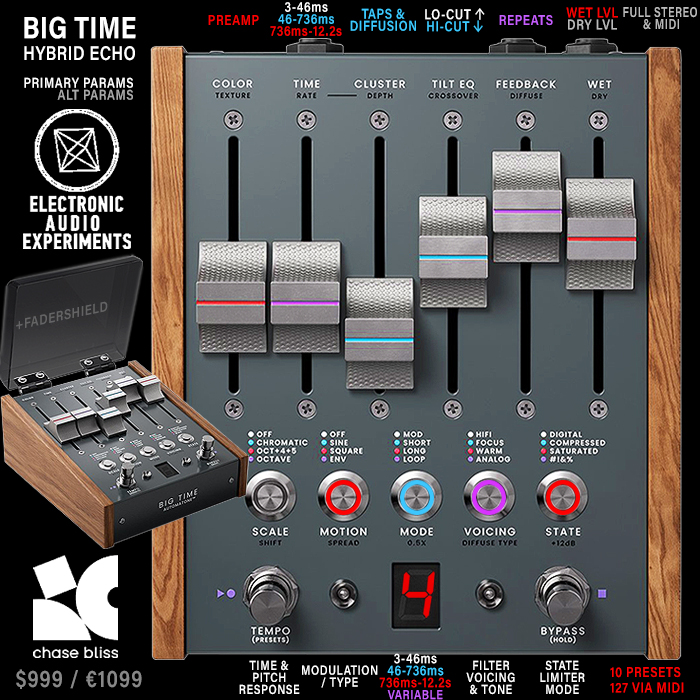
Overall I found the process of Setting, Tweaking and Saving Presets relatively straight forward - but it can be a little clunky at times - as you're forever going back and forth between different layers of Options and Parameters!
This is why I chose to break my review and overview of the device into more manageable segments - as there is so much to tap into here.
So the first 4 Presets are done - and they're mostly in the more vanilla and straightforward domain. The next 4 will be a little more experimental, more Thermae etc. - and call on some further layer options. And then I will end with a couple of Modulations - as the Chorusing on this device sounds exceptional too.
The Big Time is a massively potent Studio-Grade Machine - with yes a significant Learning Curve, but so much versatility and variability onboard. It is complicated to master to a degree - but I still prefer it to my Meris LVX, which I never fully managed to gel with. Overall my EchoSystem is still probably my number one fallback delay - because of how easy it is to dial in - and its 42+ onboard Delay Algorithms - where you can apply 2 Stereo Effects simultaneously.
The Big Time is a different beast - every bit as potent as the EchoSystem in its own - but it makes you work for it a little more. You still need to have a manual handy for both devices - for all those hidden settings - while you get used to the basics pretty quickly!
The first foray into the Big Time has been overwhelmingly positive! It's a pricey device - but probably very worth it too!
Demos